--查詢 BARCODE --
DECLARE @SN VARCHAR(22) SET @SN='FT5514A0100197I01577X2'
SELECT *
FROM MGMES.DBO.G_SN_STATUS
WHERE SERIAL_NUMBER=@SN
SELECT *
FROM MGMES.DBO.G_SN_TRAVEL
WHERE SERIAL_NUMBER=@SN
;
--Input Barcode Find Tray --
DECLARE @SHIT VARCHAR(22);
DECLARE @SN VARCHAR(22) ;
SET @SN='ft5546t03c2197n0121002'
SELECT *
FROM MGMES.DBO.G_SN_TRAVEL
WHERE SERIAL_NUMBER=@SN;
SELECT @SHIT=TRAY_BASE_ID
FROM G_TRAY_STATUS
WHERE SERIAL_NUMBER=@SN;
--
SELECT *
FROM MGMES.DBO.G_TRAY_BASE
WHERE TRAY_BASE_ID=@SHIT;
2009年7月24日 星期五
2009年7月23日 星期四
[C#] Oracle 資料庫連接
因為公司除了使用 SQL Server Database 以外,還有另外一台 Oracle Server Database ..
所以除了可以使用 Toad 之類的軟體來處理資料庫以外,有時候為了處理一些小問題
還是會需要撰寫應用程式來處理。
Example:連線到Database 下一些 SQL 語法..
using System.Data.OracleClient; //需要引用
//oracle
using (OracleConnection aaa = new OracleConnection("Data Source=IP/Database_Name;User=帳號;Password=密碼"))
{
aaa.Open();
string cmd = @"SQL語法,例如 SELECT * FROM ......等等";
OracleCommand bbb = new OracleCommand(cmd, aaa);
OracleDataReader dd = bbb.ExecuteReader();
while(dd.Read())
{
textBox2.Text = dd["PART_ID"].ToString();
}
aaa.Close();
}
所以除了可以使用 Toad 之類的軟體來處理資料庫以外,有時候為了處理一些小問題
還是會需要撰寫應用程式來處理。
Example:連線到Database 下一些 SQL 語法..
using System.Data.OracleClient; //需要引用
//oracle
using (OracleConnection aaa = new OracleConnection("Data Source=IP/Database_Name;User=帳號;Password=密碼"))
{
aaa.Open();
string cmd = @"SQL語法,例如 SELECT * FROM ......等等";
OracleCommand bbb = new OracleCommand(cmd, aaa);
OracleDataReader dd = bbb.ExecuteReader();
while(dd.Read())
{
textBox2.Text = dd["PART_ID"].ToString();
}
aaa.Close();
}
2009年7月18日 星期六
[Firefox] 擋網頁 擋網站 擋廣告(配合 FoxyProxy 套件)
由於我喜歡看小說,所以常常逛對岸的一些小說網站
所以再看小說的時候,網頁廣告(就是會跳新分頁那種)太多真是困擾了我很久
之前也有使用過 BlockSite 這個套件 ,但是總覺得用的不是很方便
所以把目前用來擋網頁廣告的方式分享出來, 也看看是不是有人會需要.
首先 必須先安裝 FoxyProxy 這個套件
1.設定一個專門用來擋網頁的 Proxy(注意:用來擋廣告的Proxy 順序要放在最上面)
在這裡我設定"垃圾"這個 Proxy名稱 作為識別
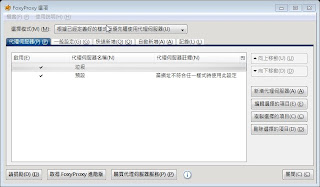
2.Proxy 設定
在 Proxy IP 填上"0" ,連接阜也填上"0" 主要用意就是讓他失效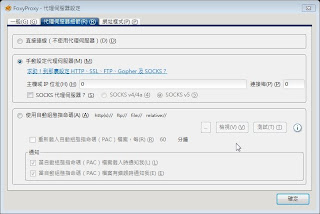
3.開啟快速新增 啟用
這樣子 就算是簡單完成了設定
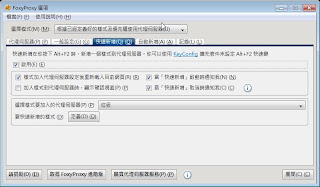
4. 接下來可以來看一下實際應用的部分
當發現有目標時(想要擋下來的目標時) 可以按 組合按鍵 "Alt + F2"

5. 結果就像下圖 網站被擋下來了
下次再跳出相同網址的頁面廣告時 , 就會自動變這樣
當然 因為網站被擋了 所以實在是想看一下廣告時 可以用 IE TAb 套件來轉
或者用 IE 來看廣告吧.
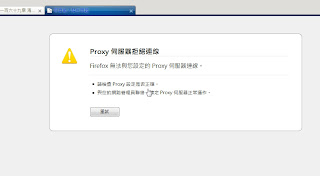
6. 目前在下已經設定了的廣告列表 就在樣式表裡面
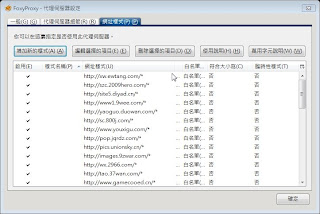
... 只是擋了網站以後 空在那裏的頁面沒辦法 自動關閉真是美中不足
不知道有沒有人有更好的方式...
所以再看小說的時候,網頁廣告(就是會跳新分頁那種)太多真是困擾了我很久
之前也有使用過 BlockSite 這個套件 ,但是總覺得用的不是很方便
所以把目前用來擋網頁廣告的方式分享出來, 也看看是不是有人會需要.
首先 必須先安裝 FoxyProxy 這個套件
1.設定一個專門用來擋網頁的 Proxy(注意:用來擋廣告的Proxy 順序要放在最上面)
在這裡我設定"垃圾"這個 Proxy名稱 作為識別

2.Proxy 設定
在 Proxy IP 填上"0" ,連接阜也填上"0" 主要用意就是讓他失效

3.開啟快速新增 啟用
這樣子 就算是簡單完成了設定

4. 接下來可以來看一下實際應用的部分
當發現有目標時(想要擋下來的目標時) 可以按 組合按鍵 "Alt + F2"

5. 結果就像下圖 網站被擋下來了
下次再跳出相同網址的頁面廣告時 , 就會自動變這樣
當然 因為網站被擋了 所以實在是想看一下廣告時 可以用 IE TAb 套件來轉
或者用 IE 來看廣告吧.

6. 目前在下已經設定了的廣告列表 就在樣式表裡面

... 只是擋了網站以後 空在那裏的頁面沒辦法 自動關閉真是美中不足
不知道有沒有人有更好的方式...
2009年5月13日 星期三
[Other] 很有趣的邏輯測試
網路上看到的 ...
---------------以下開始--------------------
TEST FOR DEMENTIA
很有趣的邏輯測試
Below are four (4) questions and a bonus question. You have to answer them instantly. You can't take your time, answer all of them immediately. Let's find out just how clever you really are. 下列有4 個問題及一個加分題,你必須立刻回答,不能花時間慢慢想,讓我們看看你有多聰明。
Ready? GO!!! (scroll down)準備好,向下捲!
First Question: 第一題
You are participating in a race. You overtake the second place person. What position are you in? 你參加賽跑,追過第 2名,你是第幾名?
Answer: If you answered that you are first, then you are wrong! If you overtake the second place person, and you take their place, you are second!
解答: 如果你的回答是第 1 名,你就錯了!你如果追過第2 名,你只是取代那人的位置,你是第 2 名。
To answer the second question, don't take as much time as you took for the first question. 回答第 2 題,你不能使用與回答第 1題相同的時間。
Second Question 第二題 :
If you are in a race, and you overtake the last person, then you are?
你參加賽跑,你追過最後一名,你是第幾名?
Answer: If you answered that you are second to last, then you are wrong again. Tell me, how can you overtake the LAST person?! You're not having a good time at this! Are you?
解答: 如果你的回答是倒數第 2 名,你又錯了!告訴我,你怎能追過最後一名?顯然你並未樂在其中!
Very tricky maths! Note: This must be done in your head only. Do NOT use paper and pencil or a calculator. Try it. 很詭異的算術!這只能在腦中盤算。不要使用紙與筆或計算機,試試看。
Third Question:第三題
Take 1000 and add 40 to it. Now add another 1000. Now add 30. Add another 1000. Now add 20. Now add another 1000. now add 10. What is the total?
以 1000加上 40 ,再加 1000,再加 30,再加 1000,現在加上 20,再加一次 1000,現在加上 10 ,總數是什麼?
Answer: Did you get 5000? The correct answer is actually 4100. Don't believe it? Check with your calculator!
解答: 得到 5000 是嗎?正確答案是4100 ,不要相信,用計算機查證吧!
Today is definitely not your day. Maybe you will get the last question right?
今天對你鐵定諸事不宜,或許最後一題你會答對?
Fourth Question: 第四題
There is a mute person who wants to buy a toothbrush. By imitating the action of brushing one's teeth he successfully expresses himself to the shopkeeper and the purchase is done. Now if there is a blind man who wishes to buy a pair of sunglasses, how should he express himself?
一個啞巴想買牙刷,他模仿刷牙的動作,成功的向店主表達,也完成了購買。現在如果一個瞎子想買一副太陽眼鏡,他要如何表達?
Answer: He just has to open his mouth and ask. He's blind, not mute - so simple.
解答: 他只要張開嘴問即可。他是瞎子,不是啞巴。就這麼簡單!

[Other] Windows Live Mail 備份郵件規則 教學
啟動註冊表編輯器的步驟如下:開始->運行->regedit
HKEY_CURRENT_USER\softwave\microsoft\windows live mail\Rules\Mail
選擇 匯出 命令,把這個郵件規則備份到安全的地方。
以後要導入此郵件規則,只要雙擊所備份的reg文件,資料就會自動導入了

HKEY_CURRENT_USER\softwave\microsoft\windows live mail\Rules\Mail
選擇 匯出 命令,把這個郵件規則備份到安全的地方。
以後要導入此郵件規則,只要雙擊所備份的reg文件,資料就會自動導入了
訂閱:
文章 (Atom)